November 21, 2009

Institute of Physics Network in the Forest of Dean and Gloucestershire

Yes! The Institute of Physics has reached the Forest of Dean and Gloucestershire. In fact, they have appointed me as Network Coordinator for that area!

Network Co-ordinators are practising physics teachers paid a small honorarium by the Institute to provide support for other physics teachers in their area.  They may organise workshops and short INSET sessions, events for pupils & teachers and help create links & share information between schools etc – whatever is most appropriate really. (See the Teacher Support page on the IOP website: www.iop.org/network for more info).

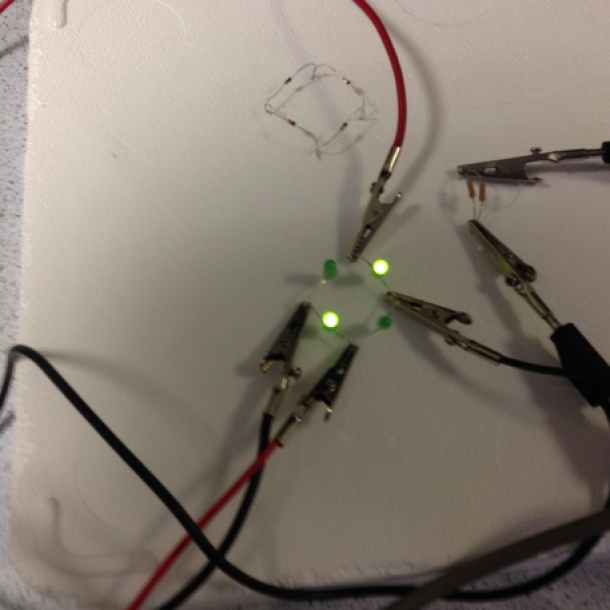
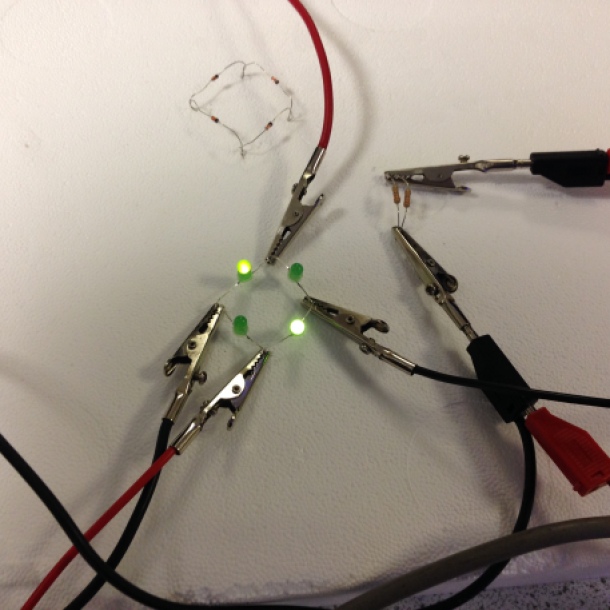
The modulated laser pen workshop at the Brecon Conference

I am teacher at Croesyceiliog School in Cwmbran and very keen to forge new links around the area of Gloucestershire and the Forest of Dean.  I have a number of tried & tested workshops for teachers (such as ‘Build a modulated laser pen’ and ‘Build a Giant Air Bazooka’ which I blogged about in this blog) and will be developing more according to demand and needs.

So, if you are a Science Teacher involved in the teaching of Physics in the area of the Forest of Dean and Gloucestershire, please help me know a bit more about you by filling in the form in the link below!

Click here to complete my form!

Thanks,

I’m really looking forward to working with you,

Alessio.

November 18, 2009

Building a giant Air-zooka!

On the 18th November 2009 a group of Physics teachers from South Wales met in Caerleon School to build giant air cannons out of a 200 litres water butt. I organised the event with Cerian Angharad’s help (South Wales Network Coordinator) and the lovely cakes that Ann Dunster (Head of Physics at the school) provided! All the equipment could be found in Wickes (though the first time I went to buy some of these huge water butts in the Cardiff branch, they told me they either got lost, or stolen… Mmm I still have to figure that one out).

Cutting holes through the butt

These chaps were not very happy when I produced my electric saw after they struggled for 15 minutes to cut their butt with a wood knife, but certainly that’s part of the fun, isn’t it?

This workshop is very useful if you are organising some spectacular activities for your Open Evening. I trialled it in my school (Croesyceiliog School, Cwmbran) and both parents and children loved it. In fact, we filled the giant air cannon with fog from a smoke machine and started shooting at people, who would see these massive smoke circles getting towards them and eventually blasting in their faces! But the fun was not over because we used McFlurry cups and tops to get the children to make their own mini-airzookas. And again the kids loved it, because they could take a little present home that costed nothing to my department, but was good fun for them.

Blasting the cameraman!

The below video shows how you can make you mini-aizooka. All you need to do is going to McDonald and order a McFlurry icecream. The rest you probably have in your house!

But what is the educational value, you might think! Well, there are a number of projects and experiments you pupils could carry out with their mini-airzookas:

1. They could make some observations about what affects the shape, speed and distance travelled by the smoke ring. E.g. by tapping the rubber in different ways, by pulling it and releasing it, etc…

2. They could try to measure the speed of the smoke rings and/or the distance travelled when they tap using more and more force. This activity could generate some very good discussions about reliability of results and method.

3. They could also measure the diameter of the rings at a certain distance from the cannon.

4. A follow on from experiment 2 could be a project were they need to design and build the most reliable tapping mechanism they can. You could even embed this as part of a long term project on electromagnetism, as the children could try to make an eletromagnetic tapper, and so on.

Please, add some more suggestions as comments!

Coming back to our

November 11, 2009

Deep Zoom and Reproduction

I have always been excited by the amazing potential of Deep Zoom in Education ever since I was given a demonstration by Stuart Ball (Microsoft Innovative Teachers Network, @innovativeteach on Twitter), when he showed me what the Hard Rock Cafe’ did for it’s Memorabilia. I tried to use the Deep Zoom Composer across the network in my School, but it did not work (apparently it conflicts with our RM network, any suggestions?). So, I was apparently stuck, but I wasn’t ready to give up yet and coming to a unit on Reproduction with my Yr 7 class I came up with a simple solution, which proved the inability to use the composer on individual PCs to be a blessing rather than a curse.

The objectives of the project:

-  To develop interdependence through a collaborative project in which all learners had to take into account the needs and objectives of other groups

-  To encourage collaboration between different groups by getting my pupils to develop and peer teach different aspects of Reproduction

-  To enhance Communication Skills through the creative and collaborative use of Deep Zoom, Community Clips and Movie Maker

-  To develop Thinking Skills by developing the project using the TASC Framework

The management of the project:

In the first lesson the groups were introduced to the project and were given an area of Reproduction to develop. All the work undertaken by the groups was their independent work and research and was carried out using the TASC Framework (see the TASC section below). In the second lesson one member of each group could use a PC to research appropriate images and diagrams to use in the whole class Deep Zoom composition, while the other members of the group continued the preparation of their displays and presentations. In the third lesson each group took it in turn to add their pictures to the Deep Zoom composition while the other groups worked on the scripts for their presentations. This was a very important part of the project, because, in composing a whole class Deep Zoom, each group had to take into account the contributions of other groups and make sure that their interventions would not affect negatively the work of others. This approach developed interdependence, creativity, flexibility and adaptability skills, and of course ICT skills, as every learner could use Deep Zoom Composer. In the last lesson each group used the Deep Zoom Composition made by the efforts of the entire class and zoomed in and out the relevant parts while they were explaining their topic to the class. They also recorded their presentations using Community Clips, but at this stage we became aware of a challenge. When they zoomed in or out Community Clips would skip a short bit of the narration, so when we played back the first clip, we realized we needed to pause between each zooming action. That has slowed down the narration a bit and it doesn’t sound as fluent as it could have been, but the results were still very good. The groups’ presentations could then be edited in Movie Maker to minimize the pauses introduced because of the above problem.

The impact on my students:

During the project I could witness a maturity I had not noticed before in my pupils. The class I run the project with behaved in a more responsible way than they had previously done in other projects not involving Reproduction and they were genuinely interested in discovering how their body works. I also noticed much improved behavior compared to the classes I taught Reproduction to in the past and I believe this is due to the collaborative nature of the project and the ownership the learners had not only on the format (as they could choose and collate their own photos in Deep Zoom), but also on the content, as they conducted all the research and produced all the resources they needed themselves (all I gave each group was a topic to develop). This proved to be successful, because many groups found interesting information that the usual text books did not have and that was a curiosity or a concern for some members of the group. In that my pupils were not only consuming knowledge, but became creators of a knowledge that better suited their needs and those of their peers. In addition, retention of these concepts was much higher than in the past and pupils from different groups could recall many aspects of the topics not developed by themselves, or their group.

November 4, 2009

Using Wallwisher to build collaborative notes!

I got this fantastic online resource from Dan Roberts (@chickensaltash on twitter) who blogged about some fantastic work his pupils did with it! Dan’s blog

So, here is how I used it so far! I got my pupils in yr 10 to split into nine groups and develop a 5W activity on energy resources. Each group was assigned one type of energy resource and the power stations assiciated with it. In the 5W activity they had a pentagon shape with an image in the middle and they had to find information to include in each box to answer the 5 questions starting with W, Who, Where, What, When, Why.

5Ws


When they were presenting their work back to the class, I asked each pupil to look at the presentations and post a sticky note on our Wallwisher whenever they spotted an advantage/disadvantage of renewable/non-renewable energy resources, so they were taking shared notes about topics created by other members of the class. I have uploaded the link to the wallwisher I created on our VLE, so they can now use those shared notes for revision!

Here is the link to our Wallwisher on energy resources

Please, comment on this blog and share with us how you use Wallwisher!!!

October 20, 2009

My top five list of features in Office 2007!

No. 1 – I found a pearl in Excel 2007, or the Share Workbook feature

You can share a workbook with multiple users over a network! Just go to the “Review” Ribbon and click on “Share Workbook” and tick the “Allow changes…” box. It’s as easy as that!

Sharing in Excel

I have used it to create real time polls in my classes and for other collaborative projects. To see the changes made by other users the individual user has to save the work repeatedly, which is not as good as spreadsheets in Google Docs. You also have the disadvantage, unlike Google Docs, that you cannot share the workbook over the Internet, but just on a local network. However,  for schools this feature is just AWESOME, because it lets you share a workbook with entire classes and you retain all the really amazing features of Excel 2007, features like Smart Arts and the new graphing tools that make look Google Docs spreadsheets like primitive cave drawings in comparison!

No. 2 – Triggers in PowerPoint

Triggers in PowerPoint allow you to start animation effects of objects on your slides at the click of other objects, so you can get things to move, change, appear and disappear by clicking on existing objects, or even “invisible” buttons that you have created. The possibilities are limitless. I have seen Blockbuster games designed with triggers and I have made multiple teams games, where from the same slide two teams can play and affect changes on the side of their team. I have also created drop down menus to navigate around your presentation (this is very effective and looks very professional) and spelling and Numeracy games. Have fun with triggers, you will find them in the Timing tool for each animation you create in PowerPoint!

The Timing tool in PPT

The Timing tool in PPT

Download my Innovid on Triggers here.

No. 3 – Ink for Office 2007

Ink has actually been around for a long time in PowerPoint, but Office 2007 has extended it to Word and Excel too, which is a great asset, if you are using an interactive whiteboard, or a Tablet PC. Well the name says it all, with Ink you can use your interactive pen to hand write directly on you PowerPoint presentations, Word documents and even Excel workbooks. I will produce an Innovid on Ink very soon, so I’ll let you know when you can access this one! Meanwhile, if you want to have a go at inking, you’ll find this tool in the Review ribbons. Have fun with it!

Ink

No. 4 – PowerPoint Plex

PPTplex is an amazing plug-in for PowerPoint 2007 that allows you to display all your slides as if they were on a canvas! You can then zoom in and out of each section of your canvas and enjoy the looks of amazement of your audience. You can also look at the PPTplex blog to get your Wiimote to act as the mouse and control your presentation using a Nintento Wii remote control. This is quite amazing!

In Education you can use PPTplex to create amazing mind maps with your classes and to create timelines that really come to life in History, etc…

Have a look at my Innovid on the Microsoft Innovative Teachers Network

No. 5 – Maths Add-in for Word 2007

The Maths Add-in enhances the already very good Equation Editor in Word 2007 and lets you solve simple and simultaneous equations. You can also plot 2-D and 3-D graphs directly in Word and trace the curve, or rotate around the axis of your choice!

This is very useful and if you this Maths is the only thing you can use it for think again, because I used it (under suggestion of Stuart Ball, Microsoft) to get my Yr 12 pupils to create a Poem to describe the Photoelectric Effect

Math Add-in

I have made an Innovid about this Add-in, so take a look at it and have fun with it!

Well, these are my top five features in Office 2007. What are yours? Please comment!!!

October 17, 2009

A new way to process your emails!

The Nubli add-in for Outlook:

Nubli is a new add-in for Outlook that allows you to process and organise your inbox in a smart and quick way. It automatically analyses your emailing history and sets priorities and groups your emails in priority sets. You can also customize these priorities and prioritize your contacts. All this a lot more features, like marking emails with actions items and reminders, can be done at the click of a button in the Nubli toolbar.

Download your free trial for Outlook 2003, or Outlook 2007, here.

Nubli for Outlook

September 19, 2009

Physics and Drama? you must be jocking! Rolls-Royce Science Prize 2008-2009

On the night of the 6th October 2009 myself and Matt Smith (John Ivins cannot attend) will represent the Physics Department (Croesyceiliog School, Cwmbran, Wales) at the Rolls-Royce Science Prize Award Dinner in the London Science Museum. We are one of nine finalists across U.K. and we are hoping to receive 1st Prize, obviously! But the competition is very tough, as the quality of the projects submitted is outstanding. So, we are up for a real challenge and a lot of heart ache.

As we are approaching the event I wanted to share with you some outlining features of our projects (underneath), and I wil post again after the dinner, hopefully with good news!

Rolls-Royce Science Prize 2008

Croesyceiliog School

Notes to the video diary

Building our modulated circuit (June 2008)

The first stage of our project was to get our pupils to research, design and build a modulated laser out of a commercial and very cheap laser pen. We wanted our pupils to actually build something, because we realised that modern devices become increasingly complex and that people perceive them as “magical boxes” that can perform amazing tasks without having any understanding of how that device really works. What we found when our pupils managed to build their modulated laser pen was that they were amazed they could actually make something they didn’t even know was possible (like sending music through a laser), and they were really gobsmacked when they realised how simple their design was. In fact, when we found a design that seemed plausible, many members of the class and, I have to confess, some teachers too were sceptical about it. They thought it would not work. In fact, our design was far too simple to perform features that to many would seem high-tech, like sending an audio signal with a laser pen across a room and play the music from a receiving light sensor and speaker. However, and thankfully, our design exceeded our expectations, as it didn’t just work, but the sound was clear and very loud once we input it into a larger amplifier! Our pupils were extremely excited and could not stop playing with the device after they built it.

Modulating Circuit 

The above diagram shows how we designed our modulating circuit. The input signal from an MP3, I-pod, CD player, etc is sent across the resistor. As this is an A.C. signal it will cause a variation in the voltage across the resistor, which in turn will cause the overall current in the circuit of the laser pen to change with the same frequency as the input signal. This overlaps with the D.C. supply current from the laser battery, which will cause the intensity of light in the laser diode to change with the same frequency. So, now our laser beam keeps varying in intensity and can be sent to a light sensor which is attached to our mini-amplifier. Because the number of photons reaching the light sensor changes with the frequency of the input signal, the current generated by the photoelectric effect in the light sensor will also change with that frequency and because now there is an A.C. signal sent into the mini-amplifier the cone of the speaker is moved by the motor effect and we can hear the sound at the other end of the lab. The capacitor in the modulating circuit is essential to let the A.C. signal through and block the D.C. current from the battery of the laser to feedback into the audio device. To many this sounds like magic, but it is in fact quite a simple process, that can be used to explain a wide range of Physics topics, like our pupils did in the next stage of their project! What I like about our device is that it is very cheap and very visual. You could buy a similar set up from a well known retailer for about £250, but we managed to make ours for about £15. And that allowed us to stay well within budget and also to make gift boxes containing our device for the schools we visited. Also, you can see exactly how our device is made, because we decided to keep it nice and simple, just soldered together and not even mounted on a circuit board, so that even the least Scientifically minded could see how the circuit was connected.

Communicating the Physics behind our device (June 2008)

When we brainstormed how to use this device to demonstrate Physics concepts within the teachers involved in the project, we thought our pupils could design a lecture type show with lots of involvement from the audience. But when we put it to them they came up with a much more creative idea! They decided they were going to write a play based on the James Bond theme and use the various situations arising in the different acts to explain the Physics concepts behind our device. In their play they also made space for interactive demonstrations where they would ask members of the audience to participate in the demonstrations. This was highly effective and very innovative. In fact, even in modern Theatre acts you don’t often see the audience actually taking part in the play! The script our yr 12 pupils wrote was amusing, engaging and full of sound Physics. In fact, our pupils decided to address an audience of younger children (Yr 9 pupils) to motivate them to appreciate Physics more and with the hope they will consider studying Physics at A-level, or Degree level.

In the various acts our yr 12 pupils were able to explain concepts from the GCSE Curriculum, such as signal modulation, Visible Spectrum as a means of Communications, Optical Fibres and reflection of light, and some A-level topics, like the Photoelectric Effect. In this last demonstration, which was put in simple and very visual terms, our yr 12 stretched the Yr 9 pupils beyond GCSE and showed them that A-level Physics can be interesting and also accessible to them. In fact, they explained the Photoelectric Effect so well that even some pupils with Additional Educational Needs could understand how the process works!

The script is self explanatory and reading it should give a very clear idea of how these concepts where presented and the level of engagement and interactivity of our show. You can read the script in the appendix to these notes!

During these visits to schools our yr 12 pupils demonstrated and employed high degrees of team work. In fact, with very little rehearsals (timetable constraints disallowed us to spend enough time to rehears and plan the logistics of the play) and no time at all to get used to new environments, they could always put up a very sound and professional performance (although none of them was a Drama student). For example, we went to a school in Torfaen that made the wooden stage in their gym available to us. So, we started to set up the laser pen and receiver on stage, when we realised that the wooden blocks sagged considerably every time you would move on them disaligning the laser beam and light sensor, as the stage was very old! So, our pupils had to think on their feet and work together to move everything quickly to the best location off stage where it could still be visible. At the end they decided to use the stage for some parts of their show and the floor underneath for others, showing great initiative. Another example is when we went to a school in Newport and we were asked to perform in a Science lab (an environment completely different from the gym), and again our pupils worked well and creatively together in solving problems such as darkening the room and setting up all scenes successfully!

Our yr 12 pupils’ perception of Physics changed too. In fact, one girl that was not achieving her real potential said that after she had to write and present the Photoelectric Effect to a younger group she started to really understand the phenomenon, while she couldn’t before. This is exactly the kind of experience we as teachers face every day. It is only when we have to teach others that we start to understand thoroughly the topics we present. Another girl in Yr 12 who was always unmotivated in class really sparked in this project and became so involved that she soon took leading responsibilities for the completion and gathering together of the script. She was not sure if she wanted to stay to do Physics in yr 13, but after our project she has decided for it. Our project also consolidated the choice of pursuing a Physics, or Engineering Degree for the rest of the yr 12 pupils.

What did people think? (July 2008 to February 2009)

We visited several schools across Torfaen and Newport and in all those our pupils were praised for the quality of their show and for the knowledge and understanding they demonstrated and could effectively transmit to their younger audience.

Most pupils from the audience told us they enjoyed the play and that it was a much more fun way to learn about Physics. They also liked the fact that older pupils and not teachers were showing them these concepts, as they could relate to them more.

The teachers’ comments were very positive and the Head of Science in Caerleon School (Newport) said that although the Photoelectric Effect might have been too difficult for her Yr 9 class, they will remember that demonstration when they study it at A-level and that will become a memorable experience that could be very valuable in their development. Also, she was impressed by the enthusiasm for Physics that our Yr 12 demonstrated and that made her wonder why her students don’t show the same enthusiasm in her lessons!

We also invited some special guests to our first play:

-          Tina Crimp (Partnership Manager, Techniquest, Cardiff) commented that the show was highly engaging and that the audience obviously understood the Physics presented to them and was also impressed by the confidence our yr 12 pupils showed.

-          Rod Cunningham (Science Advisor, Torfaen LEA) was impressed by the show and found it to be the type of stimulus that both A-level and younger students need to be motivated to study Physics at A-level and above, and this is in line to one of the Welsh Assembly objectives.

-          Paul Griffiths (Newport University) was also impressed by the interactivity of the play and by the interest and engagement shown by the audience.

The gift we presented to schools was well received and appreciated and it will be a good asset to the teaching and learning of the Physics topics we demonstrated in our play. The idea of the play and of the gift was also to spread the highly effective and visual demonstrations our pupils performed in the community around our school. We believe our play was not just for pupils in yr 9, but also for the teachers that accompanied those pupils, as they could see how much Physics can be explained using our device and also use the same modulated laser pen we gave them as a gift the next day to do similar demonstrations with their own classes. So, our project has a strong component for the professional development of colleagues too. And this last point was demonstrated by what happened after our performances and as our project built momentum!

Building Momentum (October 2008 to February 2009)

IoP Welsh Conference for Physics Teachers

IoP Welsh Conference for Physics Teachers

Our project picked up momentum very quickly, probably thanks to some of the guest that observed our progress. In fact, in October we were invited by the Institute of Physics to run a workshop at the Brecon 7th Welsh National Conference for Physics Teachers on the 8th October 2008. In this workshop the Institute of Physics funded the equipment for building one set of our modulated laser pen for each of the attending teachers. We took with us few pupils from the play and they could not just explain how they used the device to put up a show, but when the teachers were building their own sets they would go around and help in some of the trickiest bits. It was very exciting to see pupils becoming Instructors to teachers and again this developed our pupils’ confidence and team work skills even further!

With this workshop our project has, therefore, reached beyond our LEA in Torfaen and Newport into various parts of Wales. Well, actually there were teachers from outside Wales too, as far as Southampton.

Gary Williams (IoP Physics Education National Coordinator) was well pleased with our workshop and praised particularly the fact that individual teachers were making their own sets and enjoyed the hands on nature of the workshop.

Mike Pickin (Senior Lecturer in Science Education, UWIC) also attended the workshop and believed our project is having a great influence in Wales as most of his student teachers were also attending and they will have the opportunity to use and disseminate our project in various schools around (at least) South Wales, although some might even find employment in England. Also, he thought the idea of the play to be brilliant and just the kind of project that would motivate young people like his daughter (who’s currently in yr 11) to take Physics at A-level.

The outcomes of the workshop were so good, that the IoP asked us to repeat the workshop in a Twilight session in our school and in St Cyres School in Penarth (south east of Cardiff) for teachers in South Wales. The latter took place on 26th February 2009.

ASE Meeting (Techniquest, Cardiff)

ASE Meeting (Techniquest, Cardiff)

We were also asked to speak about our Rolls-Royce Science Prize project at the ASE meeting in Techniquest (Cardiff)on Thursday 29th January 2009, where we took some pupils to perform the prelude to the play and explained how our device works.


Stretching the students (March 2009)

There is no doubt that our play was perceived as being highly engaging for our audiences, but it also had components that stretched the yr 9 pupils well beyond their normal programme of studies. In fact, the explanation of the Photoelectric Effect is part of the A-level Specifications and not GCSE, so a good part of the pupils we addressed will not carry on studying the effect, as they will either leave school, or maybe not take up A-level Physics, but they will at least have had some experience of A-level Physics, explained in ways accessible to them, that would make a memorable mark in their education. Also, for those that will choose to study Physics at A-level, demonstrations such as these might help them making that choice and becoming motivated to pursue a career in a Physics related job!

However, we felt the need to stretch our yr 12 pupils to Degree level too. We soon realised that they could understand easily how their modulating circuit and receiver worked, but that they didn’t really have much understanding of how a laser diode actually achieves emission of light. Also, although this was a topic that interested our pupils, we did not have the expertise to explain that device appropriately to them. So, we approached Cardiff University and asked if they could organise a lecture on laser diodes for our students. It turned out that Cardiff University is one of the leading centres for the development of new laser diode devices and they have a lab where they produce their own laser diodes. Professor Blood was happy to invite our pupils and talk to them about such devices and our yr 12 had the opportunity to observe the production of the lasers in the lab. This was quite stimulating for them, as they could see how a real lab operates and they could see that you don’t need to be superhuman to get into Physics research, but that University labs are populated by normal postgraduate students like they could become in few years time.

We have a legacy (April 2009 onwards)

Science Made Simple

Science Made Simple

Encouraged by the outcomes of our shows we decided to attempt a bold step. We contacted Science Made Simple, a group associated to and partly funded by Cardiff University that goes around schools in Wales, England and occasionally also abroad (as far as Tokyo) to present Physics and Engineering topics in simple ways to pupils of Secondary and Primary schools. They organise shows similar to ours, but they are more like lectures than plays. However, we asked them if they were interested to collaborate with our pupils and turn our play into one of their shows, or at least to have some aspects of our projects into their show. Their response was very enthusiastic and they welcomed the idea of having a show for students written by students. Also, they were in the process of beginning to plan for a show about “Spooks and Spies” which made the connection even more natural. This cooperation with Science Made Simple started months before Rolls-Royce asked them to become our Mentors.

So, they came to our school and with our pupils they planned various aspects of their new show that will bear the acknowledgement of the school and our pupils and will potentially extend our project beyond Wales and England.

Science Made Simple has a very good reputation among schools and the Director Wendy Sadler was made Welsh Woman of the year for her contributions to Education with Science Made Simple!

August 31, 2009

Innovative Teachers in Torfaen, Wales

Hi,

It’s nearly been a year of Innovative Teachers in Torfaen and I though it’s just the right time to blog about our past experiences and successes.

How and Why we started!

It all began when Torfaen LEA in collaboration with Microsoft ITN asked me to put together a community of Innovative Teachers from the Secondary Schools in Torfaen in November 2008, as if that were an easy task. While I was driving back from the Innovative Teachers Network Specialists meeting, a vision came to me! I was determined to get our learners in Torfaen to have a say and a major input in the work of our community. I had to start somewhere, so I surveyed all pupils in my school (Croesyceiliog School, Cwmbran) and asked them what makes a good lesson and how they use technology in their learning. Then, I invited one to two teachers from each school in Torfaen and two of their pupils to attend our first Torfaen Innovative Teachers training day. The day opened with the video survey of our pupils and that formed the foundation of our work. In fact, the pupils invited from schools around Torfaen would become our Software  Experts.

Pupils’ Voice

I wanted to ensure the learners’ views, expectations and interests would shape the work we set out to complete. So, after watching the video, I demonstrated some new technologies that can be used in the classroom. Software like Photo Story 3, Deep Zoom, Photosynth and OneNote (which would become a great asset for two of our projects). Then, each teacher worked with the pupils they brought along to plan and implement a series of lessons that would exploit the potentials of such technologies in education. As teachers, we all agreed that the input of our pupils exceeded our expectations and that many great ideas they came up with we would have not thought about ourselves.

Software Experts

As I mentioned above, the pupils that helped us planning our series of lessons also delivered the lessons and became our Software Experts. The idea was that these pupils would have been able to assist their peers during the series of lessons and potentially other less ICT literate teachers who wanted to use the same software we explored. And it worked very well, because it was a great opportunity for our pupils to develop their ICT skills, their confidence and interdependence. They also had great fun in developing and delivering their work!

Our Virtual Classroom Tours

All the projects run with the help of our pupils where developed into VCTs and submitted to the U.K. Innovative Teachers Forum 2009. We were hoping to get at least one in the top ten, but we were thrilled to hear we had two. James Allan from West Monmouth School (Pontypool) submitted a great VCT on the “House of the Future” where his pupils created cardboard houses to describe the energy saving features of the house of the future. Then, they used Photo Story and Photosynth to present their work to their peers.

Photosynth and the House of the Future


Another excellent project was submitted by James Kent, Croesyceiliog School (Cwmbran). His pupils used OneNote 2007 to create a revision booklet on the effects of the Asian Tsunami. The innovation in this project was the collaborative nature of the booklet. In fact, the class was divided into different groups that would focus on different aspects of the Tsunami. As they all worked on the same OneNote notebook, the final product was a revision guide made with the contribution of the whole class.
Asian Tsunami
 
Projects like this really maximise the power of amazing software like OneNote 2007 and provide a great example of how such tools can be used to enhance the Teaching and Learning experience of our learners and educators! I was not surprised when I heard James was also invited to the European Innovative Teachers Forum 2009 in Vienna.
Unfortunately, his journey ended there (but very close to the finalists, I’m sure), but the Judges complimented Torfaen on our Pupils’ Voice approach and the idea of using Software Experts to team plan and deliver lessons in the classroom.
Our Impact
After the ITFs, we showed our work and the potential of our approach to our colleagues. Quite a few began to use similar approaches in their lessons and that encouraged us to continue to promote the Torfaen Innovative Teachers Community. With the new academic year beginning this Thursday, we are excited and motivated to begin a new round of VCTs for this year’s ITF and we are even more thrilled as I will begin a Peer Coaching Programme that will hopefully encourage more teachers in Torfaen to join the community, try new and innovative approaches and reap the benefits and their efforts.
Alessio.
 

August 28, 2009

The effects of technology in a 10 year old boy

Hi,

This is my first blog ever, so I thought it’s just fair to have as a subject the person that introduced me to Web Logging, my 10 year old nephew. As an Educator with a passion for new technologies, I enjoy watching the behavious of my nephew as he uses technology in his personal life and how much positive impact this is having in his development.

For example, last year he needed to find out how to hatch a Dragonage (at least I think that’s how you spell it) egg, so he got to his computer and searched the net to find what he needed. It was just amazing to watch him reading and selecting the information he needed. He could quickly distinguish between links that would lead him to a dead end from useful sites and in a matter of few minutes he found a detailed explanation of the procedure, applied it to his “Viva Pignata” game on his X-Box 360 and got the desired outcome. In this exercise, which he enjoyed thouroughly, he displayed and developed very useful skills, e.g. he developed his reading and comprehension skills, analysis and synthesis, etc.

Today, he was showing me WordPress and he subscribed me to it. Then he showed me how to create a blog and how he uses his blogs. Then, he needed a code from another domain in his computer, so he logged off and logged into the other partition, found the code, opened his browser, emailed the code to himself, logged in to his other domain and used the code from his email. Some of my Yr 11 pupils would not know how to do that. What was impressive wasn’t the fact he can use online email services, but the way he made technology work for him and how he solved quite a complex problem for his age.

By the way here is his blog:

aaronwyn.wordpress.com

So, has technology made him a genius? Probably not. He has always been a bright boy and has an enquiring mind, but I am sure technology has had and still has a very positive impact on his development!

Alessio